












CrontoSign, an efficient technological tool
 |
Modern and efficient, CrontoSign meets all the criteria to guarantee proven security for your Netbanking transactions (authentication and payment signature). |
Advantages of CrontoSign
- Systematic validation of non-recurring payments and payment data control means even greater transaction reliability. This is not possible with the grid card.
- It operates without an internet connection or telephone link, making it more practical for users than the SMS Connect system. Simple to use, CrontoSign will operate from anywhere in the world.
- Can be used on several smartphones and covers several Netbanking contracts.
- No limitation on use (no renewal).
- Either a smartphone (CrontoSign application) or an optical reader can be used.
How does CrontoSign work?
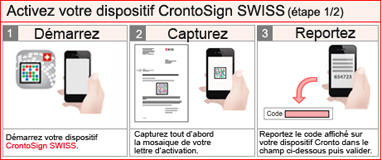
The use of CrontoSign is based on mosaic scanning. The application
instantly generates a code which, once it is keyed into Netbanking,
validates the authentication or the payment. This new process enables
log-in data and orders to be encrypted in a coloured mosaic which
cannot be falsified. The data contained in the mosaic and the
associated validation code are decrypted using the CrontoSign
application or reader and is displayed on the screen.
The
mosaic generated is unique to each operation and to each user.
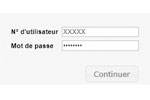
| Log on to Netbanking | Start | Capture | Transfer |
|---|---|---|---|
 |
 |
 |
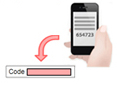 |
| Key in your contract number and your personal password | Turn on your CrontoSign device | Capture the mosaic which is displayed on your computer | Introduce the code displayed on your CrontoSign device, then validate |
The 2 CrontoSign devices
CrontoSign Swiss application |
 CrontoSign Swiss optical reader |
|
A smartphone application enabling you to scan a mosaic and obtain a
code to validate your operations or to log on. All you need is a smartphone or a tablet with a camera to be able to use CrontoSign (Download from Apple Store, Google Play Store and Windows Store.)   
|
Stand-alone optical reader enabling you to scan a mosaic and obtain
a code to validate your operations or to log on. (CHF 50 + TVA for customers, especially businesses or individuals who do not have a smartphone) |
How to obtain CrontoSign ?
Contact our online bank, Monday to Friday from 7.30am to 7.30pm and Saturday from 9am to 4pm on +41 (0)58 211 21 00. Once you have received your activation letter, simply follow the guidelines on your Netbanking screen.